


Link360: Phone Tracker
4.1297.00 Reviews
App Specs
- Version
- 2.7.10
- Updated On
- License
- Free
- Downloads
- 1,000,000+
- Developer
- SoulApps Studio
- Categories
- Lifestyle
- Platform
- Android
Screenshots
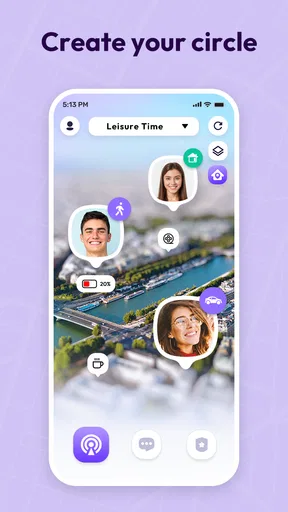
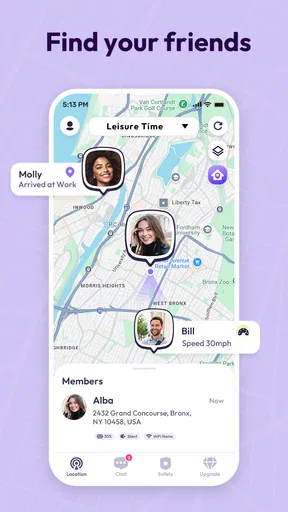
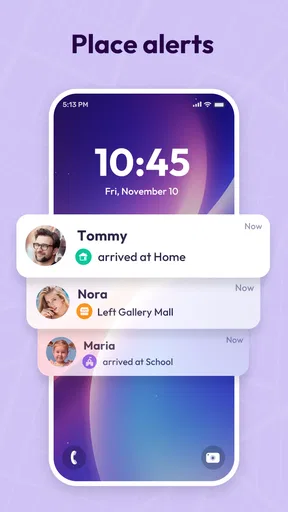
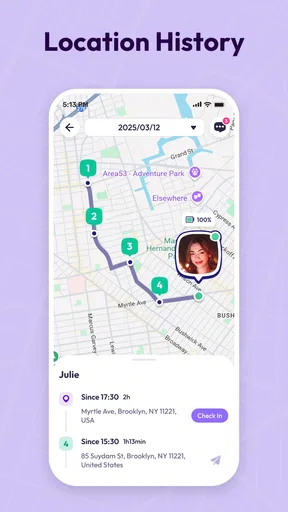
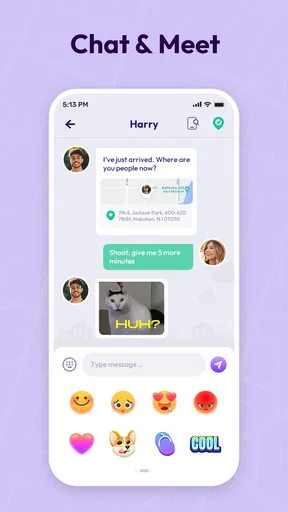

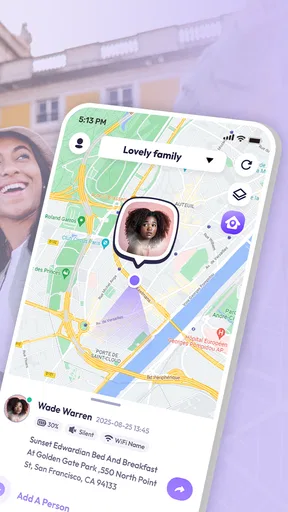
 Analysis by AppCompare
I use location-sharing apps for one simple reason: when someone I care about is travelling, I want an easy way to know they arrived safely without sending a string of messages. Link360: Phone Tracker takes that everyday need and places it in a family-safety setting, combining location sharing with a phone-locator purpose. It is a free Lifestyle app from SoulApps Studio, available for people using Android 6.0 or later, and it has grown beyond a small experiment into an app with over 1 million installs.
My first impression is that Link360 is aimed at people who want a straightforward connection between family members rather than a complicated monitoring dashboard. The store summary focuses on GPS tracking, locating phones, family safety, and sharing location, so the app’s usefulness depends less on entertainment or customization and more on whether the people in your household are willing to use it consistently. That distinction matters: a location tool can be technically capable, but it only helps when everyone understands when to share their location and respects the boundaries around it.
How Link360 fits into everyday family safety
In practice, I see Link360 as a shared point of reference for situations where a phone call is inconvenient. A parent can use it when a teenager is travelling home, partners can use it during a long commute, and relatives can use it when meeting in an unfamiliar area. The strongest use case is not watching a map all day. It is reducing uncertainty during a specific journey or agreed check-in period.
A realistic example would be a family member leaving work late. Instead of repeatedly asking for updates, that person can share their location and the others can check the app when needed. If the journey changes, the map gives the family a common context before anyone starts worrying. I would still use a message for important details, such as a cancelled train or a change of destination, because a map alone does not explain why someone has stopped moving.
That is one of the first useful distinctions with Link360: it can support communication, but it is not a replacement for communication. Location information tells you where a phone appears to be; it does not automatically tell you whether the owner is safe, why they are there, or whether the phone is being carried by the right person. I would treat it as a convenience layer around a family agreement, not as a complete emergency service.
What the free access means in practical terms
Link360 is listed as free, which makes it easy to try without committing money at the beginning. That is valuable for a household that first wants to see whether location sharing fits its routines. However, the app also includes in-app purchases ranging from $0.49 to $99.99 per item. The sensible approach is to begin with the free experience, identify which functions the family actually uses, and only then consider whether a paid option offers enough extra value.
I would not describe the presence of purchases as a reason to avoid the app by itself, but I would pay attention during setup and before confirming anything. A free download does not mean every available function is free. The verified pricing tells us the possible purchase range, but it does not establish that every household needs the most expensive option or that paying automatically improves the basic location-sharing experience. For me, the value question is therefore practical: does the free access cover the family’s normal check-ins, and if not, is a specific paid feature worth the cost?
Worth Reading Before You Choose

EA SPORTS FC Mobile 26 Is a Bigger Football Game, but It Takes Time

Flipboard Shows What News Apps Must Do Beyond the Feed

Switching to Android Auto Means Rethinking Your Driving Routine

Google Calendar Makes a Crowded Week Easier to Manage

Ludo King Makes the Most of the Minutes Between Plans

Baby Panda World Brings Quick Play to Modern Phones, but Its Game Library Feels Busy
This makes Link360 easier to recommend as a trial than as an automatic purchase. Someone who only needs occasional sharing should resist paying simply because additional tools are visible. A family that uses the app regularly can make a more informed decision after testing its day-to-day fit. I prefer that approach because location apps can become unnecessary subscriptions or purchases when a simpler routine would have worked just as well.
Where the app can save time
The main convenience is having location sharing and phone-finding intentions in one place. Without a dedicated tool, families often combine ordinary messaging, built-in device services, and manual calls. That mixture can work, but it can also create confusion about which person shared their location, whether the information is current, and where to look when a phone cannot be found quickly.
Link360 gives the family a single app to agree on. That shared habit is more important than the name of any individual function. If everyone knows that this is the place to check during a journey, fewer people need to remember several unrelated tools. I find this particularly useful for households with members who are comfortable with different phone ecosystems or who do not want to learn a technically demanding safety platform.
There is also a subtle benefit in separating routine reassurance from constant messaging. A person can check a location when they need context instead of interrupting the traveller with repeated questions. That can make the arrangement feel less intrusive, provided the family agrees on when sharing is expected and when it should be turned off.
Three habits that make the experience more useful
My first tip is to establish a clear sharing rule before anyone relies on the app. For example, a family might agree that location is shared during a late journey but not treated as an all-day requirement. This prevents the app from quietly becoming a tool for pressure or surveillance. The most useful setup is one where every participant knows what the map is for and can question the arrangement.
Second, use the app as a confirmation tool rather than staring at it continuously. Checking after an expected arrival time is more reasonable than refreshing a map every few minutes. It also reduces the chance of mistaking a temporary lack of movement for a serious problem. If something looks unusual, I would contact the person directly instead of drawing conclusions from the map.
Third, keep a backup communication habit. A phone can be misplaced, lose power, or fail to update its position. Link360 can help locate a phone or share a position, but a responsible family plan should still include a call, a text, or a known meeting point. This is an important trade-off that a short store description cannot explain: convenience is not the same as reliability in every circumstance.
What I would check before relying on it
Before making Link360 part of a family routine, I would test it with the people who are supposed to use it. Each person should know how to share a location, how to check another person’s position, and how to stop sharing when appropriate. I would also test the experience during an ordinary trip rather than waiting for an urgent situation. That small rehearsal reveals whether the interface feels understandable to everyone, including less confident smartphone users.
I would also discuss privacy openly. A family-safety app can feel supportive to one person and intrusive to another, especially if location access becomes an expectation rather than a voluntary agreement. Link360 may be a poor fit for households that cannot agree on boundaries. In that situation, a simple message-based check-in may be healthier than installing a tracking tool that creates arguments.
The app’s age rating is Everyone, which makes its general audience broad. That does not remove the need for adult judgement when using location sharing with children or vulnerable relatives. The important issue is not only whether the app can be installed, but whether the sharing arrangement is appropriate, understood, and supervised in the real household.
How it compares with usual alternatives
The usual alternatives are built-in phone-location services, ordinary messaging apps with temporary location sharing, and family-safety products that offer a wider package of controls. Link360’s appeal is its focused identity: it is designed around staying linked, locating phones, and sharing location rather than asking a family to assemble a process from several apps.
A built-in service may be the better choice for someone who wants the fewest installations and already has a trusted sharing system across their devices. Messaging may be better for a one-off meeting because it keeps the location attached to a conversation and does not require a permanent family routine. On the other hand, Link360 can make more sense for relatives who want a dedicated place to return to when location sharing is a recurring part of their safety plan.
I would choose a broader family-safety platform instead when the household needs a more extensive set of controls than location and phone-finding. Link360 should not be judged as though it were a full parental-control suite or an emergency-response service. Its value comes from its focused purpose. The narrower scope can make it easier to understand, but it can also leave advanced families wanting more.
Performance expectations and everyday friction
GPS-based tools are naturally dependent on the phone, its connection, and the surrounding environment. I would not expect Link360 to provide a perfect, continuous representation of a person’s movement. A position can be delayed or less precise, and a phone that is indoors, unavailable, or no longer with its owner can complicate the picture. These are not reasons to dismiss the app, but they are reasons to avoid treating the map as unquestionable truth.
Battery awareness is another practical consideration. Any family member who shares a location for long periods should remember that tracking-related activity can affect how often the phone needs charging, depending on how the phone and app operate together. I would use sharing deliberately, especially on long trips, and make sure the traveller carries a charger when the journey matters.
There is also a social friction that no interface can solve: everyone has to participate. If one person forgets to share, disables access, or simply does not check the app, the family may assume the system is more dependable than it really is. That is why I see onboarding and agreement as part of the product experience. A technically simple app can still fail if the household has not decided how it should be used.
Who is most likely to get real value
Link360 is a good match for families that want a dedicated location-sharing routine without starting with a complicated safety platform. It may suit parents coordinating school or evening travel, partners who regularly need arrival reassurance, and relatives who meet in busy places. It is also useful for people who often misplace a phone and want a location-oriented tool available when searching begins.
The app is especially appealing when the same small group will use it repeatedly. A shared routine makes the dedicated app worthwhile because people do not have to renegotiate the process every time someone travels. The free entry point also lowers the risk of testing it with a household before deciding whether any paid purchase is justified.
I would be more cautious about recommending it to someone who wants anonymous, one-time location sharing, because a messaging app may be faster for that purpose. I would also steer away from it for users seeking detailed parental controls, comprehensive device management, or a formally managed emergency system. Those needs call for a different category of product, not merely a different setting inside Link360.
What the app’s track record suggests
Link360 has an average rating of 4.1 from around 17 thousand ratings, alongside over 1 million installs. I read that as evidence of meaningful interest and generally positive reception, but not as proof that every family will find it perfect. A rating in that range usually makes me curious rather than unquestioning: the app is established enough to try, while the remaining room below a top score reminds me to pay attention to setup, reliability, and expectations.
The app has 297 written reviews, which can be useful for spotting recurring frustrations or strengths when deciding whether to install it. I would look for comments that match my own situation instead of relying only on the headline score. A parent of a young child, a couple sharing occasional journeys, and someone searching for a misplaced phone may all judge the same app differently.
SoulApps Studio is the developer behind it, and the current version is 2.7.10. The release date is November 25, 2022, so this is not a brand-new listing appearing without any history. Still, version information should be treated as a reason to keep the app updated, not as a guarantee that every phone behaves identically. My own decision would depend on whether the current experience feels stable on the devices used by the whole family.
My buy-or-skip judgement
I would start with Link360 if I wanted a free way to organize recurring family location sharing and phone-finding in one dedicated app. The strongest case is a household that values simplicity, can agree on privacy boundaries, and wants to test the routine before spending anything. The app’s broad Everyone rating and Android 6.0 minimum make it approachable for a wide range of Android phones, while the established install base gives me enough confidence to consider it seriously.
I would not pay for an add-on until I knew exactly what problem it solved. The purchase range runs from $0.49 to $99.99 per item, so the potential cost difference is substantial. Since the basic download is free, I would judge paid value by a concrete benefit for my household rather than by the presence of premium-looking options. If the free experience handles occasional journeys, spending more may add little. If a specific paid function becomes central to the family’s routine, then its price can be weighed on its own merits.
My final recommendation is a cautious yes for families that want a focused location-sharing tool, with the reminder that it should support—not replace—direct contact and mutual trust. I would skip it if the real need is advanced parental supervision, a one-time map link, or a guaranteed emergency solution. For the right household, Link360 can remove a surprising amount of everyday uncertainty. Its success, however, depends less on watching a dot move across a screen and more on setting sensible rules for when that dot should be shared.
Pros
- Real-time location updates help you monitor a device’s current position.
- Location history can make it easier to review recent movements.
- Geofencing alerts can notify you when someone enters or leaves an area.
- The interface is simple enough for most users to navigate quickly.
- Useful for coordinating families
- trips
- or shared devices in one place.
Cons
- Accurate tracking depends on GPS
- mobile data
- and the other phone’s battery.
- Continuous location sharing may reduce battery life on tracked devices.
- Some features may require a paid subscription or in-app purchase.
- Location updates can be delayed in buildings or areas with weak coverage.
- All users must agree to sharing their location for responsible use.
FAQs for Link360: Phone Tracker
What is Link360: Phone Tracker and how does it work?
Link360: Phone Tracker is designed to help users share and view the real-time location of family members or other trusted contacts. After installation, users generally create or join a private circle, grant the required location permissions, and invite contacts. The app then uses the phone’s GPS, Wi-Fi, and mobile network data to display location information on a map. Its accuracy and update speed can vary depending on signal, battery settings, and internet access.
Does Link360: Phone Tracker require consent from the person being tracked?
Yes. Location tracking should always be used with the knowledge and permission of the person sharing their location. Link360 is intended for voluntary location sharing between family members, friends, or trusted groups, rather than secret monitoring. Before downloading, users should review the app’s invitation and privacy controls, explain how tracking will be used, and make sure every participant understands how to pause sharing, leave a circle, or change their permissions.
Is Link360: Phone Tracker free to download and use?
The app may be available to download at no initial cost, but some features can depend on subscriptions, in-app purchases, or a limited trial period. Premium options may include extended location history, additional alerts, larger private circles, or other advanced tools. Pricing and included features can change, so it is important to check the current store listing and subscription screen before confirming payment. Also review renewal terms if a trial is offered.
What permissions and phone settings does Link360 need?
For location sharing to work reliably, Link360 may request access to location services, notifications, mobile data, and sometimes background activity or motion-related information. Background location permission can be especially important when the app must update a member’s position while the screen is off. These settings can increase battery consumption and may be restricted by Android or iOS power-saving features. You can review and change permissions in your device settings at any time.
How accurate is Link360, and can it be used to find a lost phone?
Link360 can provide useful location information, but it should not be treated as perfectly precise or guaranteed. Accuracy depends on GPS availability, indoor conditions, network coverage, device settings, and whether the phone has sufficient battery power. Location updates may also be delayed when background activity is restricted. Although the app may help you see a participating device’s last reported position, it is primarily a consent-based sharing tool and may not replace dedicated lost-device services.


